
2025-11-21
Reading e-books at Bright
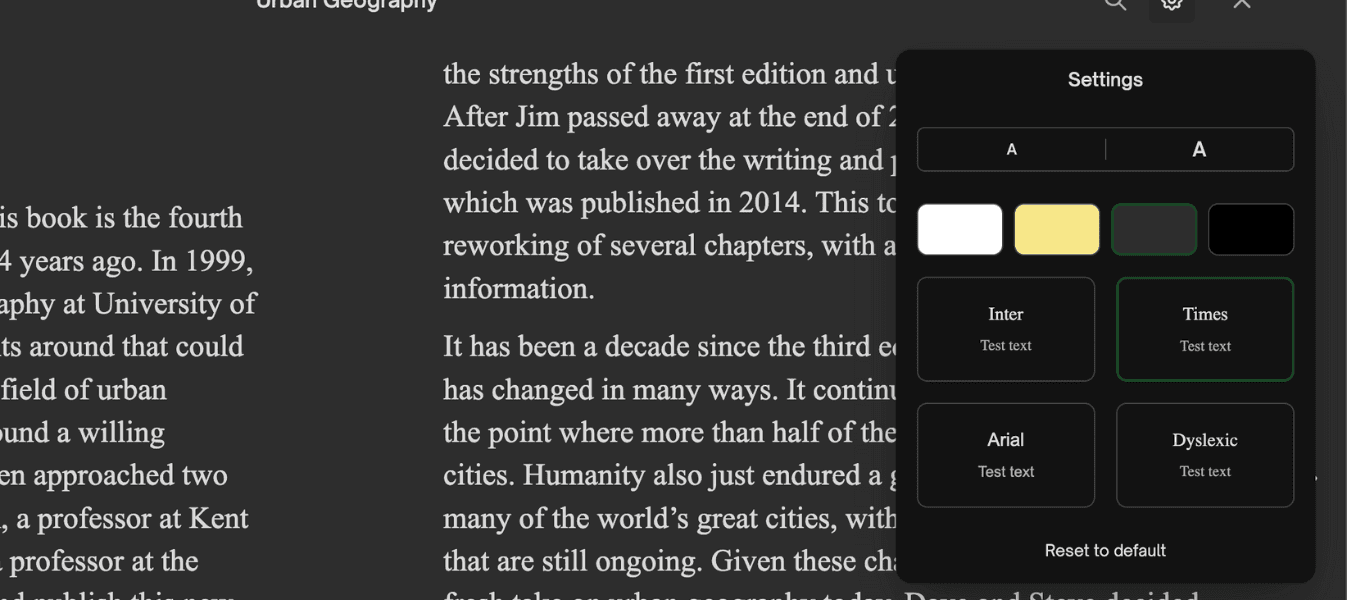
Reading an e-book at Bright is designed to feel natural, focused and efficient. Instead of just turning digital pages, you get a complete study environment built around your course literature. With tools for notes, highlighting, search and flexible reading settings, Bright helps you stay on top of your material whether you are preparing for an exam, writing an assignment or just keeping up with weekly reading.
Make notes and highlights as you go
When you read an e-book in Bright’s reader, you can quickly highlight key passages and add your own notes directly in the text. Mark important definitions, examples or explanations and attach short comments, questions or reminders. Your highlights and notes are saved automatically and gathered in one place, so you can easily return to them when you revise or prepare for a seminar.
Search the entire book in seconds
Instead of flipping back and forth through chapters, you can search across the entire e-book with a single query. Type a term, concept or name and get instant hits everywhere it appears in the text. This makes it much easier to connect ideas across chapters, revisit a specific explanation or double-check a definition while you are working on an assignment.
Jump anywhere with the table of contents
Bright’s e-reader includes a clear, clickable table of contents that mirrors the structure of the book. With one click you can jump directly to any chapter, section or subheading without scrolling. This is especially helpful when you need to move quickly between different parts of the book, compare examples or return to a particular section your teacher has referred to.
Read on computer, tablet or mobile
Whether you prefer a big screen at home or a quick reading session on the bus, your Bright e-books follow you. You can read on your computer, iPad or mobile, and your position in the book is synced so you can continue exactly where you left off. Notes and highlights are also available across all your devices, so you never lose your work when you switch from one screen to another.
Adjust the reading experience to your preferences
Everyone reads differently, and Bright lets you adapt the e-book to suit your personal preferences. You can change font size to make the text easier to read, adjust colours for better contrast or a softer look, and choose between different font types. These options help reduce eye strain and make it easier to stay focused during longer reading sessions, so you can concentrate fully on understanding the content.
Tried Bright yet?
Bright is your all-in-one study platform that helps students study smarter and get better grades. Try it for free today.